
![How to Install Any Claude Skill From GitHub [Step-by-step] - Beginner Tutorial](/_astro/How%20to%20Install%20Any%20Claude%20Skill%20From%20GitHub%20_Step-by-step_%20-%20Beginner%20Tutorial.Cgks_FcS_1swru6.webp)
.Bktem256_23EEnI.webp)
.rrgOIsSz_Z2n0to0.webp)
For Dawn Theme 7.0.1 Click Here
For Shopify Dawn Theme 8.0
Add code in header.liquid
Add the following code in header.liquid in line no. 140
Replace the following code
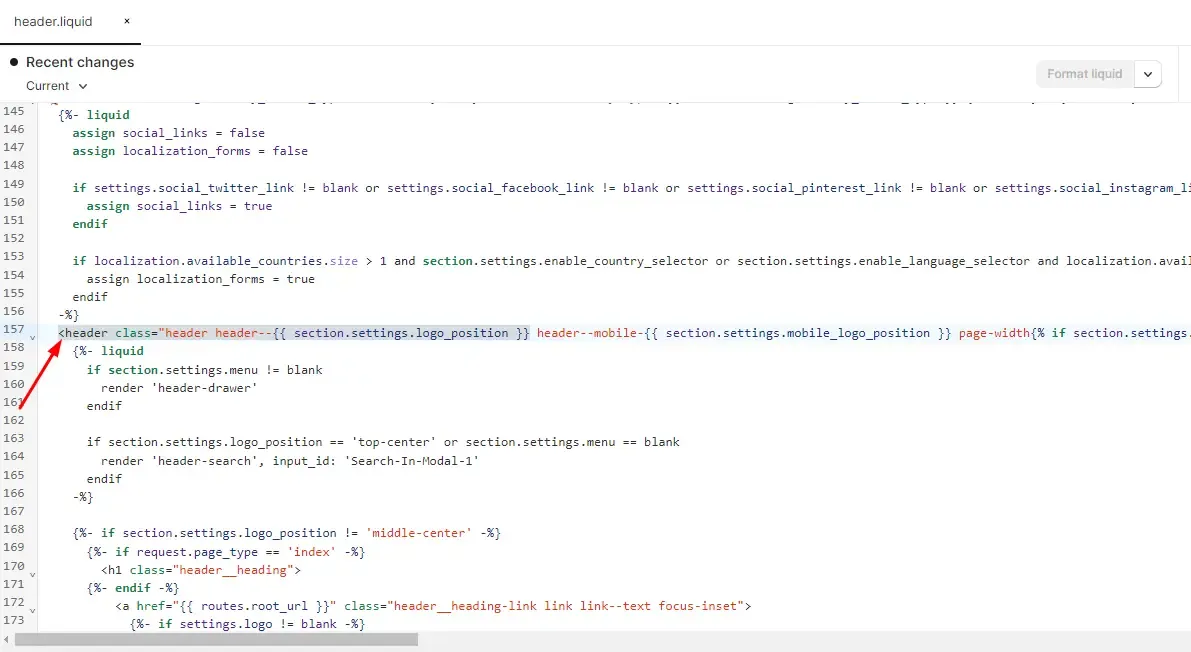
<header class="header header--{{ section.settings.logo_position }} page-width{% if section.settings.menu != blank %} header--has-menu{% endif %}">With the following code
<header id="site-header" class="header header--{{ section.settings.logo_position }} page-width{% if section.settings.menu != blank %} header--has-menu{% endif %} {% if section.settings.transparent_header %}site-header-transparent{% endif %}">Add the following code in header.liquid in line no. 143
Replace the following code
<details id="Details-menu-drawer-container" class="menu-drawer-container">
<summary class="header__icon header__icon--menu header__icon--summary link focus-inset" aria-label="{{ 'sections.header.menu' | t }}">
With the following code
<details id="Details-menu-drawer-container" class="menu-drawer-container">
<summary id="header-menu" class="header__icon header__icon--menu header__icon--summary link focus-inset" aria-label="{{ 'sections.header.menu' | t }}">
Add the following code in header.liquid line no. 312
Replace the following code
<details-modal class="header__search">With the following code
<details-modal id="header-search" class="header__search">Add code in header.liquid line no. 817 above{% schema %}
{% if template == 'index' and section.settings.transparent_header %}
{% style %}
  .template-index .site-header-transparent .header__icon, .template-index .site-header-transparent .header__menu-item span, .template-index .site-header-transparent .header__menu-item svg, .template-index .site-header-transparent .header__active-menu-item {
    color: {{ section.settings.content_color }};
   }
   .site-header-transparent {
     background: transparent;
     position: absolute;
     border: none;
     width: 100%;
     left: 50%;
     transform: translateX(-50%);
   }
   .site-header-transition {
      margin-top: var(--header-height);
   }
{% endstyle %}
<!--- Coded by websensepro.com - youtube.com/c/websensepro --->
<script>
  document.addEventListener("DOMContentLoaded", function(event) {
    var headerHeight = document.getElementById('site-header').offsetHeight;
    document.getElementById('MainContent').style.setProperty('--header-height', '-'+ headerHeight + 'px');
  });
  window.onscroll = function() {
    var header = document.getElementById('site-header');
    var main = document.getElementById('MainContent');
    var height = document.getElementById('site-header').offsetHeight;
    if ( window.pageYOffset > height ) {
      header.classList.remove('site-header-transparent');
      main.classList.add('site-header-transition');
    } else {
      header.classList.add('site-header-transparent');
      main.classList.remove('site-header-transition');
    }
  }
  document.getElementById("header-menu").addEventListener('click',function () {
    var sideMenu = document.getElementById('Details-menu-drawer-container');
    var header = document.getElementById('site-header');
    var height = document.getElementById('site-header').offsetHeight;
    if ( window.pageYOffset < height ) {
    if (!sideMenu.classList.contains('menu-opening')) {
      header.classList.remove('site-header-transparent');
    } else {
      header.classList.add('site-header-transparent');
    }
    }
  });
  document.getElementById("header-search").addEventListener('click',function () {
    var search = document.getElementById('template-index');
    var header = document.getElementById('site-header');
    var main = document.getElementById('MainContent');
    var height = document.getElementById('site-header').offsetHeight;
    if ( window.pageYOffset < height ) {
      if (search.classList.contains('overflow-hidden')) {
        header.classList.remove('site-header-transparent');
        main.classList.add('site-header-transition');
      } else {
        header.classList.add('site-header-transparent');
        main.classList.remove('site-header-transition');
      }
    }
  });
</script>
{% endif %}
header.liquid Line no. 914 with in Scheme code below “t:sections.all.colors.label”
{
      "type": "header",
      "content": "Transparent Header"
    },
    {
      "type": "checkbox",
      "id": "transparent_header",
      "label": "Enable transparent header",
      "default": false
    },
    {
      "type": "color",
      "id": "content_color",
      "label": "Change icon & text color"
    },
Add code in theme.liquid
Theme.liquid line no. 241
Replace the following code
<body class="gradient">With the following code
<body {% if template == 'index' %}id="template-index"{% endif %} class="gradient {% if template == 'index' %}template-index{% endif %}">For Shopify Dawn Theme 7.0.0 +
Recently, I was working on a Dawn theme project and needed to make the header sticky and transparent. I wasn’t sure how to do it at first, but after some research, I found a way. In this blog post, I will share with you how to make a sticky and transparent header in Dawn. Let’s get started!
Delete header.liquid code
Delete everything between the {% javascript %} {% endjavascript %} tags, code will like as follows:
{% javascript %}
  class StickyHeader extends HTMLElement {
    constructor() {
      super();
    }
    connectedCallback() {
      this.header = document.getElementById('shopify-section-header');
      this.headerBounds = {};
      this.currentScrollTop = 0;
      this.preventReveal = false;
      this.predictiveSearch = this.querySelector('predictive-search');
      this.onScrollHandler = this.onScroll.bind(this);
      this.hideHeaderOnScrollUp = () => this.preventReveal = true;
      this.addEventListener('preventHeaderReveal', this.hideHeaderOnScrollUp);
      window.addEventListener('scroll', this.onScrollHandler, false);
      this.createObserver();
    }
    disconnectedCallback() {
      this.removeEventListener('preventHeaderReveal', this.hideHeaderOnScrollUp);
      window.removeEventListener('scroll', this.onScrollHandler);
    }
    createObserver() {
      let observer = new IntersectionObserver((entries, observer) => {
        this.headerBounds = entries[0].intersectionRect;
        observer.disconnect();
      });
      observer.observe(this.header);
    }
    onScroll() {
      const scrollTop = window.pageYOffset || document.documentElement.scrollTop;
      if (this.predictiveSearch && this.predictiveSearch.isOpen) return;
      if (scrollTop > this.currentScrollTop && scrollTop > this.headerBounds.bottom) {
        requestAnimationFrame(this.hide.bind(this));
      } else if (scrollTop < this.currentScrollTop && scrollTop > this.headerBounds.bottom) {
        if (!this.preventReveal) {
          requestAnimationFrame(this.reveal.bind(this));
        } else {
          window.clearTimeout(this.isScrolling);
          this.isScrolling = setTimeout(() => {
            this.preventReveal = false;
          }, 66);
          requestAnimationFrame(this.hide.bind(this));
        }
      } else if (scrollTop <= this.headerBounds.top) {
        requestAnimationFrame(this.reset.bind(this));
      }
      this.currentScrollTop = scrollTop;
    }
    hide() {
      this.header.classList.add('shopify-section-header-hidden', 'shopify-section-header-sticky');
      this.closeMenuDisclosure();
      this.closeSearchModal();
    }
    reveal() {
      this.header.classList.add('shopify-section-header-sticky', 'animate');
      this.header.classList.remove('shopify-section-header-hidden');
    }
    reset() {
      this.header.classList.remove('shopify-section-header-hidden', 'shopify-section-header-sticky', 'animate');
    }
    closeMenuDisclosure() {
      this.disclosures = this.disclosures || this.header.querySelectorAll('details-disclosure');
      this.disclosures.forEach(disclosure => disclosure.close());
    }
    closeSearchModal() {
      this.searchModal = this.searchModal || this.header.querySelector('details-modal');
      this.searchModal.close(false);
    }
  }
  customElements.define('sticky-header', StickyHeader);
{% endjavascript %}
Add code in global.js
Add the following code on the bottom of global.js file
class StickyHeader extends HTMLElement {
  constructor() {
    super();
  }
  connectedCallback() {
    this.header = document.getElementById('shopify-section-header');
    this.header.classList.add('shopify-section-header-sticky');
    this.headerBounds = {};
    this.currentScrollTop = 0;
    this.preventReveal = false;
    this.predictiveSearch = this.querySelector('predictive-search');
    this.onScrollHandler = this.onScroll.bind(this);
    this.hideHeaderOnScrollUp = () => this.preventReveal = true;
    this.addEventListener('preventHeaderReveal', this.hideHeaderOnScrollUp);
    window.addEventListener('scroll', this.onScrollHandler, false);
    this.createObserver();
  }
  disconnectedCallback() {
    this.removeEventListener('preventHeaderReveal', this.hideHeaderOnScrollUp);
    window.removeEventListener('scroll', this.onScrollHandler);
  }
  createObserver() {
    let observer = new IntersectionObserver((entries, observer) => {
      this.headerBounds = entries[0].intersectionRect;
      observer.disconnect();
    });
    observer.observe(this.header);
  }
  onScroll() {
    const scrollTop = window.pageYOffset || document.documentElement.scrollTop;
    if (this.predictiveSearch && this.predictiveSearch.isOpen) return;
    /*
    if (scrollTop > this.currentScrollTop && scrollTop > this.headerBounds.bottom) {
      requestAnimationFrame(this.hide.bind(this));
    } else if (scrollTop < this.currentScrollTop && scrollTop > this.headerBounds.bottom) {
      if (!this.preventReveal) {
        requestAnimationFrame(this.reveal.bind(this));
      } else {
        window.clearTimeout(this.isScrolling);
        this.isScrolling = setTimeout(() => {
                                      this.preventReveal = false;
                                      }, 66);
        requestAnimationFrame(this.hide.bind(this));
      }
    } else if (scrollTop <= this.headerBounds.top) {
      requestAnimationFrame(this.reset.bind(this));
    }
    */
    this.currentScrollTop = scrollTop;
  }
  /*
  hide() {
    this.header.classList.add('shopify-section-header-hidden', 'shopify-section-header-sticky');
    this.closeMenuDisclosure();
    this.closeSearchModal();
  }
  reveal() {
    this.header.classList.add('shopify-section-header-sticky', 'animate');
    this.header.classList.remove('shopify-section-header-hidden');
  }
  reset() {
    this.header.classList.remove('shopify-section-header-hidden', 'shopify-section-header-sticky', 'animate');
  }
  */
  closeMenuDisclosure() {
    this.disclosures = this.disclosures || this.header.querySelectorAll('details-disclosure');
    this.disclosures.forEach(disclosure => disclosure.close());
  }
  closeSearchModal() {
    this.searchModal = this.searchModal || this.header.querySelector('details-modal');
    this.searchModal.close(false);
  }
}
 customElements.define('sticky-header', StickyHeader);
Replace Code in Theme.liquid
Replace following code
<body class="gradient">With following code
<body {% if template == 'index' %}id="template-index"{% endif %} class="gradient {% if template == 'index' %}template-index{% endif %}">Replace Code in header.liquid
There are multiple changes in this file make sure not to miss anything
Header Tag Update
Replace following code
<header class="header header--{{ section.settings.logo_position }} page-width{% if section.settings.menu != blank %} header--has-menu{% endif %}">With following code
<header id="site-header" class="header header--{{ section.settings.logo_position }} page-width{% if section.settings.menu != blank %} header--has-menu{% endif %} {% if section.settings.transparent_header %}site-header-transparent{% endif %}">Details Tag Update
Replace following code
<details id="Details-menu-drawer-container" class="menu-drawer-container">
          <summary class="header__icon header__icon--menu header__icon--summary link focus-inset" aria-label="{{ 'sections.header.menu' | t }}">
With following code
<details id="Details-menu-drawer-container" class="menu-drawer-container">
<summary id="header-menu" class="header__icon header__icon--menu header__icon--summary link focus-inset" aria-label="{{ 'sections.header.menu' | t }}">
Details-modal Tag Update
Replace following code
<details-modal class="header__search">With following code
<details-modal id="header-search" class="header__search">Add code above Schema tag
{% if template == 'index' and section.settings.transparent_header %}
{% style %}
  .template-index .site-header-transparent .header__icon, .template-index .site-header-transparent .header__menu-item span, .template-index .site-header-transparent .header__menu-item svg, .template-index .site-header-transparent .header__active-menu-item {
    color: {{ section.settings.content_color }};
   }
   .site-header-transparent {
     background: transparent;
     position: absolute;
     border: none;
     width: 100%;
     left: 50%;
     transform: translateX(-50%);
   }
   .site-header-transition {
      margin-top: var(--header-height);
   }
{% endstyle %}
<!--- Coded by websensepro.com - youtube.com/c/websensepro --->
<script>
  document.addEventListener("DOMContentLoaded", function(event) {
    var headerHeight = document.getElementById('site-header').offsetHeight;
    document.getElementById('MainContent').style.setProperty('--header-height', '-'+ headerHeight + 'px');
  });
  window.onscroll = function() {
    var header = document.getElementById('site-header');
    var main = document.getElementById('MainContent');
    var height = document.getElementById('site-header').offsetHeight;
    if ( window.pageYOffset > height ) {
      header.classList.remove('site-header-transparent');
      main.classList.add('site-header-transition');
    } else {
      header.classList.add('site-header-transparent');
      main.classList.remove('site-header-transition');
    }
  }
  document.getElementById("header-menu").addEventListener('click',function () {
    var sideMenu = document.getElementById('Details-menu-drawer-container');
    var header = document.getElementById('site-header');
    var height = document.getElementById('site-header').offsetHeight;
    if ( window.pageYOffset < height ) {
    if (!sideMenu.classList.contains('menu-opening')) {
      header.classList.remove('site-header-transparent');
    } else {
      header.classList.add('site-header-transparent');
    }
    }
  });
  document.getElementById("header-search").addEventListener('click',function () {
    var search = document.getElementById('template-index');
    var header = document.getElementById('site-header');
    var main = document.getElementById('MainContent');
    var height = document.getElementById('site-header').offsetHeight;
    if ( window.pageYOffset < height ) {
      if (search.classList.contains('overflow-hidden')) {
        header.classList.remove('site-header-transparent');
        main.classList.add('site-header-transition');
      } else {
        header.classList.add('site-header-transparent');
        main.classList.remove('site-header-transition');
      }
    }
  });
</script>
{% endif %}
Add code inside Schema Tag
Add code above following code
{
      "type": "image_picker",
      "id": "logo",
      "label": "t:sections.header.settings.logo.label"
    }
Add the following code before { inside scheme tag which will add options in our Customizer settings
{
      "type": "header",
      "content": "Transparent Header"
    },
    {
      "type": "checkbox",
      "id": "transparent_header",
      "label": "Enable transparent header",
      "default": false
    },
    {
      "type": "color",
      "id": "content_color",
      "label": "Change icon & text color"
    },
    {
      "type": "header",
      "content": "Logo"
    },